
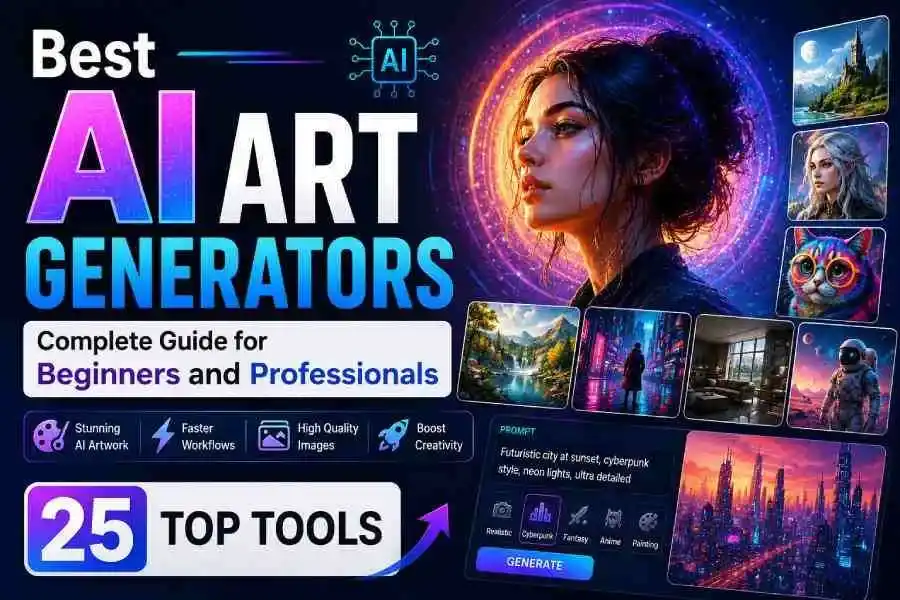
 Over the past few years, generative artificial intelligence has moved from simple digital novelties into essential production software. Modern AI platforms handle lighting, human anatomy, text rendering, and style transfers with precision. By learning how to leverage these platforms, you can produce visual assets, marketing graphics, concept art, and high-resolution illustrations in a fraction of the time traditionally required.
Table of Contents
- What Is an AI Art Generator?
- Why AI Art Generators Are Popular in 2026
- How We Chose the 25 Best AI Art Generators
- Quick Comparison Table
- 25 Best AI Art Generators in 2026
- Best AI Art Generators by Category
- Free vs Paid AI Art Generators
- How to Choose the Right AI Art Generator
- How to Write Better AI Art Prompts
- Common Mistakes to Avoid
- AI Art Generator Pricing Explained
- Copyright, Ethics & Commercial Use
- Best Use Cases for AI Art Generators
- Expert Tips for Better AI Artwork
- Future of AI Art Generation
- Frequently Asked Questions
- Key Takeaways
- Conclusion
What Is an AI Art Generator?
An AI art generator is software that creates digital artwork using artificial intelligence algorithms. Instead of manually drawing every detail on a canvas or digital tablet, users describe the image they want using a descriptive text prompt, and the AI produces original artwork within seconds. These platforms use advanced machine learning models trained on millions of images and text descriptions to understand visual concepts, artistic styles, color harmonies, lighting physics, composition rules, and spatial relationships between objects.
Over the past few years, AI art technology has evolved rapidly. Earlier image generators often produced unrealistic human faces, distorted hands with extra fingers, blurry textures, and inconsistent backgrounds. Modern AI models have significantly improved their understanding of natural language, perspective, anatomy, lighting physics, and complex artistic styles. This allows users to generate highly detailed illustrations, realistic portraits, product mock-ups, concept art, architectural visualisations, scalable icons, and ready-to-publish marketing graphics.
Today, AI art generators are used across dozens of industries, including graphic design, digital marketing, publishing, web development, video game design, architecture, advertising, social media management, and e-commerce. They help creators, freelancers, and corporate teams produce high-quality visuals quickly while drastically reducing production time and creative costs. For more context on visual branding tools, check out our guide on Best AI Logo Generators for Businesses.
Understanding AI Art Generation
AI image generation relies on deep neural networks—primarily latent diffusion models and autoregressive transformer models—that analyze structural patterns from vast image datasets. When you enter a detailed text prompt such as “a futuristic city at sunset with flying cars, wet reflective streets, and cinematic lighting”, the AI interprets every descriptive noun, verb, and adjective in your request. It then combines its learned knowledge to construct a unique image matching your description, building it up from visual noise into a clean rendering.
The clearer and more detailed your text prompt, the more accurately the AI can execute your vision. Many modern platforms also allow users to modify generated images in real time. You can edit specific regions, upscale images to 4K resolution, remove unwanted objects, expand canvas backgrounds beyond their original borders, or generate consistent character variations across multiple scenes.
How AI Art Generators Work
Although different software platforms run on different underlying technology stacks, the core image generation workflow follows a simple sequence:
- Prompt Entry: The user writes a descriptive text prompt specifying the subject, context, lighting, camera angle, and artistic style.
- Text Parsing: The AI text encoder breaks the text down into numerical tokens to interpret concepts and relationships.
- Visual Synthesis: The underlying latent diffusion or transformer model predicts how pixels should be arranged based on those concepts.
- Iterative Denoising: The algorithm refines a field of random visual noise through dozens of mathematical steps into a crisp, high-resolution rendering.
- Image Output: The system outputs multiple image variations for user review.
- Post-Processing & Editing: The user selects their preferred image to upscale, edit with inpainting, reframe, or export.
Many professional AI tools support advanced controls such as prompt weighting, image references, negative prompts, style presets, aspect ratio selection, seed values, and model switching for more consistent results.
Text-to-Image vs Image-to-Image AI
| Feature | Text-to-Image | Image-to-Image |
|---|---|---|
| Input Type | Written text prompt | Existing image + optional text prompt |
| Main Purpose | Create brand-new visual artwork from scratch | Transform, restyle, or enhance existing artwork |
| Creative Freedom | Very High (Unlimited subject possibilities) | Moderate (Guided by source image structure) |
| Best Use Cases | Illustrations, concept art, storyboards, posters | Photo editing, style transfer, sketch-to-render |
| User Control | Prompt and parameter dependent | Reference image composition dependent |
Common Features of AI Art Tools
- Text-to-image generation from natural language descriptions
- Image-to-image transformations and restyling
- AI inpainting (editing specific regions within an image)
- AI outpainting and canvas background expansion
- Automatic background removal and object segmentation
- AI upscaling to 4K and 8K print-ready resolutions
- Style transfer and brand preset controls
- High-resolution exports in PNG, JPG, WEBP, and SVG formats
- Prompt history logs and seed tracking
- Cloud storage and asset management libraries
- Team collaboration hubs and shared workspaces
- Commercial licensing guarantees and enterprise legal protections
Benefits for Beginners and Professionals
AI art generators simplify creative work regardless of your experience level or visual arts training.
Beginners can create professional-looking artwork without taking years to learn complex digital painting software, perspective theory, or manual drawing techniques. Simply describing an idea in clear, natural language is often enough to generate impressive graphics instantly.
Professionals benefit from accelerated brainstorming, rapid concept development, interactive client pitch presentations, advertising creative variations, product visualisations, and web asset creation. Rather than replacing human creativity, AI acts as a high-speed productivity engine that helps artists, illustrators, and designers explore dozens of artistic directions in minutes.
Why AI Art Generators Are Popular in 2026
The popularity of AI image generation continues to surge because it dramatically reduces the time, cost, and complexity required to produce high-quality visual content. Steady improvements in generative AI models, faster cloud graphics processing, and streamlined browser user interfaces have made these tools indispensable for personal and commercial projects.
Faster Creative Workflows
Traditional digital illustration, graphic design, or commercial photo shoot workflows often require hours or days of execution time. AI image generators produce multiple production-ready concepts in under thirty seconds. Designers can quickly iterate through options, present initial ideas to stakeholders, and spend more energy refining polished concepts instead of building from scratch.
Improved Image Quality
Modern 2026 AI models generate sharp, color-accurate images with precise lighting dynamics, natural surface textures, photorealistic human features, legible typography rendering, and strict adherence to complex prompts. This level of visual quality makes AI art suitable for print publishing, corporate presentations, advertising campaigns, digital product interfaces, and video production storyboards.
Affordable Design Solutions
Hiring custom illustration teams or licensing expensive stock photography for every single blog post, ad variation, or social banner can quickly become costly for growing businesses. AI art generators provide a scalable, cost-effective alternative by enabling users to generate unique graphics on demand through free access tiers or low-cost monthly subscriptions.
Commercial Applications
Businesses increasingly rely on AI-generated artwork for social ad creatives, blog headers, YouTube thumbnails, website banners, presentation decks, product packaging mock-ups, e-commerce promotional banners, and full brand identities. Learn how to pair custom graphics with optimized content in our comprehensive guide to SEO Content Writing Strategies.
Growing AI Adoption Across Industries
Today, AI image generators are an everyday part of creative workflows for:
- Graphic designers and visual communicators
- Digital marketing agencies and media buyers
- Content creators, streamers, and video editors
- Bloggers and digital publishers
- Small business owners and startup founders
- Book publishers and independent authors
- Game developers and concept artists
- Architects and interior spatial designers
- Educators and instructional designers
- Students and researchers
- Freelance illustrators and creative directors
- Print-on-demand e-commerce sellers
The widespread adoption of AI image generation shows how these tools have shifted from fun experimental novelties into essential professional software.
How We Chose the 25 Best AI Art Generators
Not every AI image generator delivers the same quality, speed, or feature set. Some platforms focus heavily on cinematic artistic quality, while others prioritize prompt fidelity, interface simplicity, text rendering, or team workflows. To build a balanced, reliable list for 2026, we evaluated each platform across nine core criteria that matter to everyday creators and professional teams.

1. Image Quality
We tested fine detail, color balance, lighting realism, shadow placement, structural composition, human anatomical accuracy, texture fidelity, and upscaling performance for print and screen formats.
2. Prompt Accuracy
The best AI art generators should follow complex, multi-subject prompts, artistic style requests, specific lighting conditions, camera lens settings, and composition directives with high accuracy and few mistakes.
3. Ease of Use
We looked at user interface organization, control placement, prompt assistance tools, canvas editing layouts, and onboarding pathways for beginners alongside efficiency tools for power users.
4. Editing Features
We prioritized platforms that offer built-in post-generation editing tools, including regional inpainting, outpainting, canvas expansion, layer control, background removal, object eraser brushes, and upscaling.
5. Generation Speed
Processing speed matters during client meetings and high-volume project builds. We measured cloud processing times, queue latency, and concurrent batch generation speeds.
6. Pricing and Value
We carefully analyzed free tiers, credit cost models, subscription plans, hidden fees, and overall value across light, moderate, and enterprise user tiers.
7. Commercial Licensing
We checked copyright policies, commercial use rights, platform terms of service, legal indemnification protections, and asset ownership rules for paid and free accounts.
8. Platform Compatibility
Cross-platform support—including web browser apps, native desktop software, mobile applications, browser extensions, and API integrations—was evaluated for flexibility across workflows.
9. Community & Support
We evaluated community size, prompt sharing hubs, user documentation, video tutorials, platform update schedules, customer support channels, and style model libraries.
Quick Comparison Table of the 25 Best AI Art Generators
| Tool Name | Best Used For | Free Tier | Paid Pricing | Commercial Use* | Image Quality | Ease of Use | Platform Access | Overall Score |
|---|---|---|---|---|---|---|---|---|
| ChatGPT Images | Conversational editing & graphics | Limited | From $20/mo | Plan dependent | ★★★★★ | ★★★★★ | Web / Mobile | 9.8/10 |
| Midjourney | Cinematic & detailed artwork | No | From $10/mo | Yes (Paid) | ★★★★★ | ★★★★☆ | Web / Discord | 9.7/10 |
| Adobe Firefly | Commercial design integration | Yes | From $9.99/mo | Yes (Commercially Safe) | ★★★★★ | ★★★★★ | Web / Desktop | 9.6/10 |
| Stable Diffusion | Custom models & local control | Yes | Open Source / Varies | Model dependent | ★★★★★ | ★★★☆☆ | Web / Local PC | 9.5/10 |
| Ideogram | Clean typography & posters | Yes | From $8/mo | Yes (Paid) | ★★★★☆ | ★★★★★ | Web | 9.3/10 |
| Leonardo AI | Game assets & concept art | Yes | From $10/mo | Yes | ★★★★★ | ★★★★☆ | Web / Mobile | 9.5/10 |
| Microsoft Designer | Quick social graphics & slides | Yes | Included in Copilot | Terms apply | ★★★★☆ | ★★★★★ | Web / Windows | 9.1/10 |
| Canva AI | All-in-one graphic design | Yes | From $12.99/mo | Yes | ★★★★☆ | ★★★★★ | Web / Mobile | 9.4/10 |
| Recraft | Scalable vectors & icons | Yes | From $20/mo | Yes | ★★★★★ | ★★★★☆ | Web / Desktop | 9.3/10 |
| Playground AI | Canvas editing & mixing | Yes | From $15/mo | Yes | ★★★★☆ | ★★★★★ | Web | 9.4/10 |
| Dream by WOMBO | Mobile art styles & sketches | Yes | From $9.99/mo | Limited | ★★★☆☆ | ★★★★★ | Mobile / Web | 9.0/10 |
| NightCafe | Community challenges & styles | Yes | From $4.79/mo | Yes | ★★★★☆ | ★★★★☆ | Web / Mobile | 9.2/10 |
| Craiyon | 100% free prompt generation | Yes | From $6/mo | Limited on free | ★★★☆☆ | ★★★★★ | Web | 8.6/10 |
| DeepAI | Simple API generation & code | Yes | From $4.99/mo | Yes | ★★★☆☆ | ★★★★☆ | Web / API | 8.8/10 |
| FLUX | Photorealism & prompt accuracy | Varies | Provider based | Model dependent | ★★★★★ | ★★★★☆ | Web / API | 9.7/10 |
| Mage.Space | Unfiltered model choices | Yes | From $8/mo | Model dependent | ★★★★☆ | ★★★★☆ | Web | 9.1/10 |
| Pixlr AI | Browser photo editing + AI | Yes | From $4.90/mo | Yes | ★★★★☆ | ★★★★★ | Web / Mobile | 9.3/10 |
| Fotor AI | Portrait touch-ups & visuals | Yes | From $3.33/mo | Yes | ★★★★☆ | ★★★★★ | Web / Mobile | 9.2/10 |
| Picsart AI | Social media content creation | Yes | From $5/mo | Yes | ★★★★☆ | ★★★★★ | Mobile / Web | 9.1/10 |
| Artbreeder | Gene-mixing & character art | Yes | From $8.99/mo | Yes | ★★★★☆ | ★★★★☆ | Web | 8.9/10 |
| Runway | AI motion & multimedia art | Yes | From $12/mo | Yes | ★★★★★ | ★★★★☆ | Web | 9.5/10 |
| Krea AI | Real-time enhancement & canvas | Yes | From $24/mo | Yes | ★★★★★ | ★★★★☆ | Web | 9.4/10 |
| getimg.ai | Inpainting & model training | Yes | From $9/mo | Yes | ★★★★☆ | ★★★★☆ | Web | 9.2/10 |
| ImagineArt | Quick mobile prompts & styles | Yes | From $7/mo | Yes | ★★★★☆ | ★★★★★ | Mobile / Web | 8.9/10 |
| SeaArt AI | Anime models & custom LoRAs | Yes | From $1.99/mo | Model dependent | ★★★★☆ | ★★★★☆ | Web / Mobile | 9.1/10 |
*Commercial usage rights depend on each provider’s active subscription plans and licensing terms. Always review official platform policies before using AI-generated visual assets for client work or commercial projects.
25 Best AI Art Generators in 2026
Every AI art platform offers unique strengths. Certain tools excel at photorealistic portraits and product shots, while others focus on vector graphics, anime art, graphic design layouts, readable typography, or game environment assets. Selecting the ideal software depends on your creative workflow, budget, technical skill level, and output requirements.
Below are detailed reviews for all 25 top AI art generators in 2026, highlighting key features, advantages, drawbacks, pricing structures, commercial policies, and recommended use cases.
1. ChatGPT Images
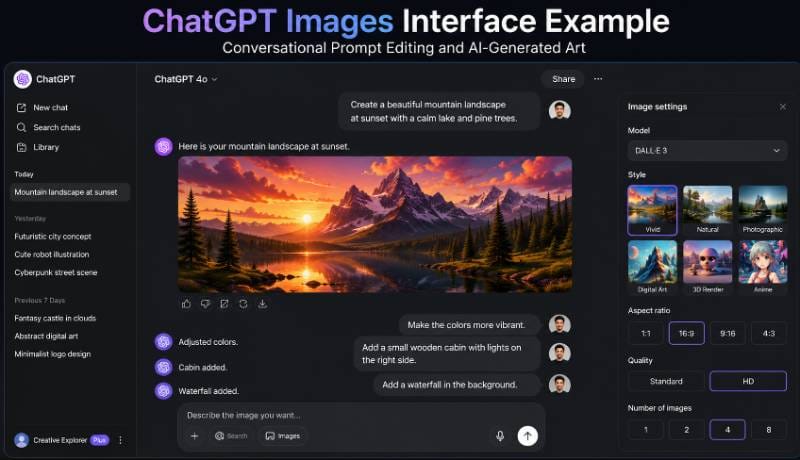
ChatGPT Images is one of the most versatile and accessible AI image generators available in 2026. Powered by OpenAI’s advanced DALL-E model family and multimodal vision architecture, it lets users generate graphics through natural conversation. Instead of writing complex, technical prompt strings from scratch, users can describe ideas casually and refine images through follow-up chat messages.
Key Features
- Natural language conversational image creation and prompt building
- Targeted image region editing via conversational instructions or point-and-click masks
- Wide range of styles including photorealism, digital watercolor, isometric 3D, and vector flat art
- Strong text rendering capabilities for logos, signs, labels, and badges
- Contextual memory that maintains stylistic elements across multi-turn image generation sessions
- Direct integration with ChatGPT Plus research tools, web browsing, and document analysis
Pros
- Extremely beginner-friendly interface with zero prompt technicalities required
- Refines compositions, colors, lighting, and subjects using simple conversational instructions
- Translates vague ideas into polished, high-detail visual art
- Consistent visual outputs across multiple creative iterations
- Saves time by combining writing, brainstorming, and image creation in one chat window
Cons
- Lacks fine-grained canvas controls like manual seed entry, ControlNet layers, or custom LoRAs
- Rate limits apply during peak usage hours on Plus and Enterprise tiers
Pricing
Free plan available with usage limits. Paid plans start at $20/month for ChatGPT Plus, providing access to higher generation limits and priority speeds.
Best For
Bloggers, content creators, digital marketers, social media managers, authors, and educators who need a fast, conversational graphic tool.
Commercial Use
OpenAI assigns output ownership rights to the user for generated images, subject to their terms of service. Review current subscription guidelines for full details.
Verdict
The top all-around AI art generator for creators who want high-quality images and conversational editing without a steep technical learning curve.
2. Midjourney
Midjourney remains one of the most respected AI art generators for digital artwork, photorealistic scenes, and creative concept design. Known for its distinct artistic flair, realistic lighting, rich textures, and dramatic camera framing, Midjourney is the preferred platform for creative directors, concept artists, and visual storytellers worldwide.
Key Features
- Unmatched aesthetic quality with realistic lighting, shadows, and fine detail rendering
- Advanced aspect ratio controls, upscaling models, and image variation controls
- Pan and Zoom functions to expand images in any direction without losing style consistency
- Vary Region (inpainting) tool to edit selected visual elements on a canvas
- Style Tuner and Style Reference parameters to replicate brand aesthetics across projects
- Web canvas workspace alongside traditional Discord server commands
Pros
- Produces striking, high-end artistic imagery and photorealistic renderings
- Understands complex lighting, lens options, cinematic styles, and artistic genres
- Active global community offering vast prompt inspiration and style references
- Regular model updates continuously improve hand anatomy, face detail, and text accuracy
Cons
- Does not offer a permanent free trial tier; requires a paid subscription plan
- Prompting complex composition structures can require trial and error
Pricing
Basic Plan starts at $10/month, Standard Plan is $30/month, and Pro Plan is $60/month with unlimited GPU fast/relax generation modes.
Best For
Professional illustrators, concept artists, creative agencies, filmmakers, game designers, and book publishers.
Commercial Use
Commercial rights are included on all paid subscription tiers. Companies earning over $1,000,000 annually require the Pro or Mega plan.
Verdict
The premier choice for creators who prioritize cinematic visual quality, high detail, and creative artistic style.
3. Adobe Firefly
Adobe Firefly brings generative AI directly into professional workflows like Adobe Photoshop, Illustrator, and Adobe Express. Firefly stands out for its enterprise focus on legal safety. It is trained primarily on Adobe Stock images, openly licensed work, and public domain assets, making it commercially safe for enterprise brand work.
Key Features
- Generative Fill and Generative Expand built directly into Adobe Photoshop
- Text-to-Vector Graphics generation for scalable vector artwork in Adobe Illustrator
- Generative Recolor for instant vector color paletting
- Text Effects generation for stylized typography and creative titles
- Built-in style controls for camera angles, lighting moods, color tones, and art materials
- Content Credentials metadata integration to ensure transparent AI provenance
Pros
- Commercially safe AI architecture designed to protect brands from copyright risks
- Seamless integration with Photoshop, Illustrator, and Adobe Express desktop workflows
- Precise layer controls, selection tools, and vector masking options
- Simple web interface for non-designers needing quick visual asset creation
Cons
- Style rendering leans towards safe, commercial stock photography rather than artistic flair
- Generative credits apply across Creative Cloud plan tiers
Pricing
Free tier includes 25 monthly generative credits. Premium standalone plan starts at $9.99/month, or included with Adobe Creative Cloud subscriptions.
Best For
Graphic designers, corporate creative departments, marketing agencies, photo editors, and publishers.
Commercial Use
Designed specifically for commercial safety. Images generated with Firefly are backed by commercial licensing terms under paid Adobe plans.
Verdict
The safest and most practical choice for graphic design professionals and marketing teams who rely on Adobe software.
4. Stable Diffusion
Stable Diffusion, developed by Stability AI alongside open-source research communities, is the premier choice for users seeking total technical control. Unlike locked cloud systems, open-weight Stable Diffusion models (including SDXL and Stable Cascade) can be installed locally on your PC, trained on custom datasets, and expanded with thousands of community-built add-ons.
Key Features
- Open-source model architecture that runs locally on consumer graphics hardware (NVIDIA GPUs)
- Support for ControlNet layers to lock pose structures, depth maps, and line art contours
- Custom LoRA (Low-Rank Adaptation) training for consistent brand faces, characters, and styles
- Advanced user interfaces like Automatic1111, ComfyUI, and InvokeAI for custom workflows
- Inpainting, outpainting, upscaling, image-to-image, and prompt weighting controls
- Zero recurring subscription costs when run locally on personal hardware
Pros
- Complete control over generation parameters, privacy, local file storage, and hardware usage
- Thousands of free fine-tuned community models available on platforms like Civitai
- No censorship constraints or cloud queue waiting times when run locally
- Unmatched flexibility for developer builds, custom extensions, and specialized art workflows
Cons
- Steep learning curve requiring technical knowledge of settings, hardware, and workflow nodes
- Requires a dedicated graphics card with sufficient VRAM (8GB+ recommended)
Pricing
100% free open-source model files for local hardware. Hosted web platforms (like Stability Cloud or DreamStudio) offer pay-as-you-go credit packs.
Best For
Advanced AI creators, game developers, software engineers, technical artists, and privacy-conscious users.
Commercial Use
Depends on the specific model license version. Core open-source community releases generally allow commercial use, but always verify current license terms.
Verdict
The ultimate AI platform for advanced users who demand full control, complete privacy, custom model training, and zero monthly fees.
5. Ideogram
Ideogram has resolved one of generative AI’s biggest historic challenges: rendering clean, accurate, legible text within images. Whether you need stylish typography for a poster, brand merchandise graphics, event invitations, book titles, or logo designs, Ideogram excels at placing correct text into visual compositions.
Key Features
- Top-tier text rendering engine for accurate spelling, font styling, and word placement
- Magic Prompt feature that automatically expands short ideas into descriptive text prompts
- Style presets including Typography, Illustration, Poster, 3D Render, and Cinematic Photo
- Remix and Image-to-Image editing tools to evolve visual concepts step by step
- Aspect ratio controls tailored for print posters, social graphics, and mobile screens
- Public community feed for prompt discovery and design sharing
Pros
- Consistently renders readable, correctly spelled text on signs, shirts, and posters
- Simple interface suitable for non-designers needing fast promotional graphics
- Magic Prompt feature turns vague ideas into detailed, creative image concepts
- High-quality illustration styles with crisp lines and balanced compositions
Cons
- Fewer advanced photographic lighting and texture options compared to Midjourney or FLUX
- Free tier generations are added to a public community library
Pricing
Free plan available with daily slow credits. Paid plans start at $8/month (Basic) up to $20/month (Plus) for fast rendering and private generations.
Best For
Marketing teams, poster designers, merchandise creators, social media managers, and small business owners.
Commercial Use
Commercial usage rights are provided on paid subscription tiers. Review Ideogram’s terms of service for full details.
Verdict
The premier choice whenever your AI-generated art needs legible text, sharp typography, and bold poster styling.
6. Leonardo AI
Leonardo AI is a feature-rich, browser-based AI platform tailored for concept artists, game developers, asset designers, and digital illustrators. It combines fine-tuned AI models, real-time generation canvases, texture generation tools, and advanced upscaling capabilities inside an intuitive user interface.
Key Features
- Access to fine-tuned AI models optimized for game assets, anime, photorealism, and concept art
- AI Canvas workspace for real-time inpainting, outpainting, erased region filling, and layering
- Realtime Canvas tool that renders brush strokes and rough sketches into detailed art instantly
- Custom model training feature to build personalized style models using your own image uploads
- 3D Texture Generation for game assets and digital environment rendering
- Universal Upscaler tool to enhance detail, skin texture, and sharpness for high-resolution exports
Pros
- Outstanding tool set designed specifically for game developers and concept artists
- Generous free credit system that resets every 24 hours
- Real-time rendering tools speed up initial concept exploration
- Easy custom model training requires no complex coding knowledge
Cons
- Credit consumption can add up quickly when using high-end upscaling features
- The feature-rich interface may feel overwhelming for absolute beginners
Pricing
Free plan includes 150 daily generation credits. Paid subscription tiers start at $10/month (Apprentice) up to $48/month (Maestro).
Best For
Game developers, concept illustrators, character designers, 3D artists, and print-on-demand e-commerce sellers.
Commercial Use
Commercial creation rights are allowed on generated images, including assets created on the free tier.
Verdict
An exceptional platform for game creators, concept artists, and illustrators needing fine-tuned model control and canvas editing.
7. Microsoft Designer
Microsoft Designer integrates DALL-E image generation with automated graphic design, layout templates, and Microsoft 365 tools. It is built for non-designers who want to transform text prompts into social media posts, invitation cards, blog banners, or slides without opening complex design software.
Key Features
- Generates custom AI images and places them directly into editable design layouts
- Automated canvas formatting for Instagram posts, LinkedIn banners, flyers, and presentation slides
- AI background removal, object eraser, and background replacement with one click
- Direct integration with Copilot across Microsoft Edge, Windows 11, and Microsoft 365 apps
- Brand Kit feature to maintain consistent color palettes and font styles
- Prompt suggestion engine to improve creative phrasing
Pros
- 100% free to access with a standard Microsoft account
- Combines AI image generation with editable typography, frames, and graphic templates
- Fast design creation for users with limited graphic design background
- Seamless integration with Windows and Microsoft Office tools
Cons
- Limited fine-tuned artistic controls compared to specialist AI platforms like Midjourney
- Canvas layout customization options are basic compared to Canva or Photoshop
Pricing
Free to use with a Microsoft Account. Higher boost speeds are available via Microsoft 365 or Copilot Pro subscriptions ($20/month).
Best For
Students, office workers, small business owners, social media managers, and educators needing quick graphic layouts.
Commercial Use
Subject to Microsoft’s Copilot and Designer terms of service. Always check usage policies before publishing commercial ad assets.
Verdict
A fast, practical free option for users who need AI graphics embedded directly into ready-to-share promotional layouts.
8. Canva AI
Canva AI brings generative artificial intelligence directly into Canva’s widely used drag-and-drop graphic design platform. Through its Magic Studio suite—featuring Magic Media, Magic Edit, Magic Expand, and Magic Grab—users can generate custom artwork and drop it into presentations, social posts, flyers, or video graphics.
Key Features
- Magic Media text-to-image and text-to-video generation engines
- Magic Edit tool to swap, add, or transform visual elements using short text commands
- Magic Expand to stretch image backgrounds seamlessly into different aspect ratios
- Magic Grab to select, isolate, and move text or objects within a flat photo
- Seamless drag-and-drop placement across Canva’s huge template and design library
- Team brand kit syncing, cloud storage, and shared workspace collaboration hubs
Pros
- All-in-one graphic ecosystem combining AI art creation, vector design, and publishing
- Very easy learning curve suitable for teams and non-technical staff
- Generates art and places it instantly onto social media templates, print items, or slides
- Excellent cloud collaboration features for teams and remote marketing departments
Cons
- Generative image resolution and artistic detail are lower than Midjourney or FLUX
- AI generation allowances are capped on monthly credit quotas
Pricing
Free plan available with basic AI credits. Canva Pro starts at $12.99/month (or $119.99/year), providing full access to Magic Studio tools.
Best For
Marketing teams, social media managers, small business owners, content creators, educators, and bloggers.
Commercial Use
Images created using Canva’s AI features can be used commercially, subject to Canva’s content license agreement and third-party AI provider policies.
Verdict
The premier all-in-one platform for creators who want to combine AI art generation with real-world graphic design templates.
9. Recraft
Recraft is an AI design generator engineered specifically for graphic designers, brand builders, and UI/UX specialists. Unlike traditional raster-only AI platforms, Recraft can generate clean, infinitely scalable vector graphics (SVG), 3D icon sets, flat illustrations, and brand asset libraries.
Key Features
- Generates clean, fully editable Scalable Vector Graphics (SVG) alongside high-res raster art
- Custom style palette builder to train AI assets on exact brand color codes
- Specialized model modes for vector art, 3D icons, pixel art, logos, and line illustrations
- Infinite canvas workspace for arranging, modifying, and editing multiple assets together
- Vector clean-up tools, path editing, and background removal directly on canvas
- High-resolution vector export formats suitable for print, web interfaces, and mobile apps
Pros
- Creates true vector graphics that can be scaled infinitely without quality loss
- Exceptional tool for building consistent icon sets, UI elements, and brand graphics
- Clean, intuitive canvas interface designed specifically for visual design workflows
- Precise control over color palettes, line weights, and artistic style consistency
Cons
- Focused on design assets and illustrations rather than photographic art
- Free tier projects are saved in a public library feed
Pricing
Free plan includes basic daily generation credits. Paid plans start at $20/month for fast rendering, commercial privacy, and full SVG export access.
Best For
Brand designers, UI/UX designers, vector illustrators, app developers, and marketing agencies.
Commercial Use
Full commercial ownership rights apply to assets generated on paid subscription tiers.
Verdict
The undisputed leader for generating clean, scalable vector art, icons, and branded design assets.
10. Playground AI
Playground AI is a flexible, browser-based creative suite that blends AI image generation with digital canvas editing. It gives creators a unified workspace where they can generate artwork, mix styles, erase elements, and expand image backgrounds with precision.
Key Features
- Infinite digital canvas interface for composing complex multi-image layouts
- Regional inpainting, background replacement, and object removal controls
- Supports multiple underlying AI models, including Stable Diffusion and Playground v2.5
- Preset filters for photographic lighting, cinematic style, anime, and oil painting
- Image-to-image and edge-control sliders for precise structural guidance
Pros
- Canvas workspace makes editing complex visual scenes intuitive
- Generous free daily generation allowance for casual users
- Strong image composition tools with precise masking brushes
Cons
- Upscaling high-resolution images consumes credits quickly
- Interface can take time to master for non-designers
Pricing
Free plan available with daily credits. Pro plan starts at $15/month for expanded limits and priority speed.
Best For
Digital artists, web designers, content creators, and visual editors.
Commercial Use
Commercial usage rights are permitted under platform licensing terms.
Verdict
A versatile canvas-based art generator that balances ease of use with detailed editing control.
11. Dream by WOMBO
Dream by WOMBO is an easy-to-use, mobile-first AI art generator built for quick creative exploration. Users enter a prompt, select from dozens of vibrant style presets (like Fantasy, Anime, Steampunk, or Watercolor), and generate colorful artwork in seconds.
Key Features
- Mobile-first app experience available on iOS, Android, and web browsers
- Dozens of distinct artistic style presets to apply with a single tap
- Image-to-image reference controls for quick concept sketching
- Community artwork feed for discovering creative prompts and remixing styles
- High-resolution image export options for wallpaper and print use
Pros
- Extremely fun and simple interface requiring zero prior technical knowledge
- Vibrant, creative style presets produce impressive visual art instantly
- Ideal for mobile creators generating phone wallpapers or social art on the go
Cons
- Lacks precision editing tools like inpainting, masking, or ControlNet layers
- Free version includes ad pop-ups and generation queue delays
Pricing
Free tier available with ad support. Premium subscription starts at $9.99/month or $169.99 for lifetime access.
Best For
Casual artists, mobile phone users, students, and hobbyists exploring AI visuals.
Commercial Use
Review current terms of service; commercial usage rules are restricted on free tiers.
Verdict
The top mobile choice for fun, colorful, style-driven AI artwork generated on the go.
12. NightCafe
NightCafe is a popular AI art community and multi-model generation platform. It allows creators to experiment with top AI models—including Stable Diffusion, DALL-E, and FLUX—all inside a single user dashboard featuring daily creative challenges and active social forums.
Key Features
- Multi-model access hub supporting Stable Diffusion, DALL-E, FLUX, and specialized engines
- Daily community art contests and prompt sharing forums
- Style transfer technology to apply iconic painted styles onto existing images
- Bulk image generation, upscaling, and seed management tools
- Cross-platform support across web browsers and mobile devices
Pros
- Access multiple top AI image models inside one unified user dashboard
- Active, welcoming community with daily contests and constructive prompt feedback
- Generous daily credit reward system for participating in community activities
Cons
- Credit cost structure varies depending on the specific AI model selected
- Interface can feel cluttered due to the high volume of community features
Pricing
Free daily credits earned through log-ins and challenges. Paid credit packs and subscriptions start at $4.79/month up to $49.99/month.
Best For
AI art hobbyists, community contest enthusiasts, and creators who want to compare multiple AI models.
Commercial Use
Commercial rights belong to the creator, subject to the license of the specific AI model used.
Verdict
A fun, multi-engine platform backed by an active creator community.
13. Craiyon
Craiyon (formerly DALL-E Mini) is a simple, completely free browser-based AI art generator. It allows anyone to enter a text prompt and receive nine image options instantly without requiring account registration or payment details.
Key Features
- Nine-grid instant image generation for rapid concept browsing
- No registration or login required to start generating art
- Art, Drawing, Photo, and None style toggle switches
- Built-in negative prompt field to remove unwanted visual elements
- Simple print-on-demand t-shirt preview integration
Pros
- 100% free accessibility with zero sign-up friction
- Generates nine visual variations simultaneously for fast idea iteration
- Accessible from any desktop or mobile browser instantly
Cons
- Significantly lower image resolution and anatomical accuracy compared to Midjourney or FLUX
- Free tier displays advertisements and experiences slower queue generation times
Pricing
100% Free with ad support. Paid tiers start at $6/month to remove ads and speed up generation times.
Best For
Absolute beginners, students, researchers, and casual users wanting quick free art generation.
Commercial Use
Free tier usage requires attribution under Craiyon’s terms of service. Paid tiers grant commercial usage rights.
Verdict
The most accessible free starting point for anyone exploring text-to-image AI for the first time.
14. DeepAI
DeepAI provides an accessible web interface and developer API for AI image generation, text processing, and visual enhancements. It is designed for software developers building applications and creators needing simple, straightforward image outputs.
Key Features
- Simple web art generator interface alongside robust REST API endpoints
- Multiple style filters including HD Image, Fantasy World, Cyberpunk, and Anime
- AI Image Editor for modifying uploaded photos using text instructions
- Colorizer tool to automatically add natural colors to black-and-white photos
- Fast image processing speeds for web apps and API software pipelines
Pros
- Developer-friendly REST API integration with comprehensive documentation
- Clean, lightweight web layout free from cluttered distraction
- Consistent processing speeds for programmatic batch creation
Cons
- Visual rendering detail is modest compared to specialized platforms like Midjourney
- Fewer manual fine-tuning options for advanced artists
Pricing
Free web access with basic limits. DeepAI Pro costs $4.99/month or pay-as-you-go API credits starting at $5.
Best For
Software developers, web app builders, tech enthusiasts, and casual creators needing simple generation.
Commercial Use
Images generated via DeepAI enter the public domain, allowing broad commercial use.
Verdict
A reliable choice for software developers needing easy API access and lightweight web generation.
15. FLUX
FLUX, developed by Black Forest Labs (founded by key creators of Stable Diffusion), is one of the most advanced open-weight image models available in 2026. Renowned for its prompt adherence, photographic realism, accurate human anatomy, and precise text rendering, FLUX sets a new technical standard across generative AI platforms.
Key Features
- Top-tier prompt adherence that follows complex, detailed visual descriptions precisely
- Photorealistic human rendering with accurate skin textures, facial details, and hands
- Exceptional text rendering engine capable of writing clean words on objects and signs
- Multiple model weights including FLUX.1 [schnell] for speed and FLUX.1 [pro] for top quality
- Available through open weights for local deployment or hosted cloud APIs
- Advanced lighting physics, natural depth-of-field, and photographic realism
Pros
- Delivers photorealistic visual quality and prompt adherence
- Accurately renders complex multi-subject scenes, fine hand details, and spelled text
- Flexible deployment options across cloud APIs or local high-VRAM GPU setups
Cons
- Running top-tier FLUX models locally requires substantial GPU hardware VRAM
- Third-party cloud API costs vary depending on the provider implementation
Pricing
Open weights are free for non-commercial/research use. Commercial API access rates vary by cloud host provider (e.g., Replicate, Fal.ai, Together.ai).
Best For
Professional visual creators, commercial photographers, developers, and power users demanding high photorealism.
Commercial Use
FLUX.1 [schnell] open weights permit commercial use; FLUX [pro] API usage includes commercial rights. Always verify model license tier rules.
Verdict
A leading open-weight model setting the benchmark for prompt accuracy and photographic realism in 2026.
16. Mage.Space
Mage.Space is a web-based AI generation workspace that gives users access to dozens of open-source diffusion models inside a single subscription. It offers a fast, unrestricted creative workspace for artists exploring diverse art styles without local hardware setups.
Key Features
- Access to dozens of community diffusion models inside one web interface
- Supports Stable Diffusion v1.5, SDXL, custom LoRAs, and specialized fine-tunes
- Built-in enhancement, upscaling, inpainting, and ControlNet features
- Unfiltered generation options with customizable content safety filters
- Fast parallel image batch generation on high-speed cloud GPUs
Pros
- Explore dozens of custom community models without downloading huge model files
- Fast cloud processing speeds even during high-volume batch generations
- Clean user interface with simple parameter controls
Cons
- Full access to advanced models requires a paid monthly subscription tier
- Model library volume can require testing to find the best option for your style
Pricing
Free plan available for basic model generation. Premium plans range from $8/month (Basic) to $15/month (Pro).
Best For
Digital illustrators, anime creators, and power users who want access to custom models without local hardware setups.
Commercial Use
Commercial rights depend on the specific underlying open-source model selected.
Verdict
A convenient cloud platform for accessing custom diffusion models without local hardware requirements.
17. Pixlr AI
Pixlr AI integrates generative AI creation directly into Pixlr’s browser-based photo editing software. Users can generate custom images, generate background elements, remove unwanted objects, and apply graphic filters all inside one web editor.
Key Features
- Text-to-image generator integrated alongside full layer-based photo editing software
- AI Generative Fill, Expand, and Remove tools built directly into the editor canvas
- One-click AI background removal and object cutout tools
- Smart portrait touch-up and skin smoothing features
- Extensive filter library, vector overlays, and typography templates
Pros
- Combines AI art creation with traditional layer-based photo editing software
- Runs smoothly inside any modern desktop or tablet web browser
- Fast photo editing workflow for social banners and website graphics
Cons
- Generative image detail is modest compared to Midjourney or FLUX
- Free version includes display ads and export watermarks on certain tools
Pricing
Free plan available with daily usage limits. Plus plan starts at $4.90/month, Premium is $7.90/month.
Best For
Bloggers, website managers, social media creators, and photo editors wanting a browser-based workflow.
Commercial Use
Commercial usage rights are included on paid subscription tiers.
Verdict
A practical choice for creators who want AI art generation integrated directly into an online photo editor.
18. Fotor AI
Fotor AI combines generative AI creation with a popular online photo editing suite. Known for its one-tap retouching tools, Fotor allows creators to generate AI images, polish portraits, enhance photo colors, and create marketing collateral within a simple interface.
Key Features
- Text-to-image and image-to-image generation engines
- AI Photo Enhancer for automatic clarity, color, and exposure adjustments
- AI Portrait Editor for skin smoothing, face touch-ups, and background blur
- Background Remover and AI Object Eraser tools
- Large collection of graphic templates for social media and marketing materials
Pros
- Extremely beginner-friendly interface with automatic one-tap correction tools
- Great combination of AI image creation and practical photo touch-up capabilities
- Accessible via web browsers, Windows/Mac desktop apps, and mobile devices
Cons
- High-resolution exports and advanced AI features require a paid subscription
- Watermarks apply to free tier downloads
Pricing
Free plan with limited access. Fotor Pro starts at $3.33/month (billed annually) or $8.99/month (billed monthly).
Best For
Content creators, bloggers, marketers, and small business owners needing quick photo edits and graphics.
Commercial Use
Commercial usage rights are available under Fotor Pro subscription plans.
Verdict
An easy-to-use option for non-designers needing quick AI art creation alongside photo touch-up tools.
19. Picsart AI
Picsart AI offers a mobile-first creative editing platform equipped with generative AI tools. Hugely popular among mobile creators, social influencers, and digital marketers, Picsart simplifies building eye-catching social stories, promotional banners, and custom stickers.
Key Features
- Mobile-first AI image generator with stylized art filters
- AI Avatar generator and custom sticker creator tools
- AI Background Replace and smart object eraser brushes
- Huge library of community overlays, fonts, borders, and graphic frames
- Batch editing capabilities for social content production
Pros
- Feature-rich mobile application for iOS and Android platforms
- Fun visual tools designed specifically for social media trends and content creation
- Huge library of community assets and customizable templates
Cons
- Interface can feel ad-heavy on the free tier
- Desktop browser web app features are less comprehensive than the mobile app
Pricing
Free tier available with basic access. Picsart Plus starts at $5/month, Gold plan is $7/month.
Best For
Social media influencers, Instagram/TikTok creators, mobile content editors, and micro-businesses.
Commercial Use
Commercial licensing is available on paid subscription tiers. Always check specific asset license terms.
Verdict
The top mobile app choice for social media creators building custom stickers, avatars, and promotional graphics.
20. Artbreeder
Artbreeder uses generative adversarial networks (GANs) and diffusion models to let users blend, morph, and cross-breed images together. Rather than relying solely on text prompts, creators adjust visual attribute sliders (genes) to manipulate character faces, landscapes, anime figures, and fantasy artwork.
Key Features
- Gene-mixing sliders to adjust age, gender, facial structure, hair color, lighting, and expressions
- Mix feature to cross-breed two source images into a hybrid art piece
- Prompter tool combining text prompts with gene slider adjustments
- Patterns feature to transform simple structural shapes into complex artistic landscapes
- Collaborative community tree where users can fork and evolve existing art creations
Pros
- Unique creative process based on visual slider tweaking rather than text engineering
- Exceptional tool for character portrait design and fantasy facial variations
- Fosters collaborative creativity through open community image evolution
Cons
- Not designed for general commercial graphic workflows like vector assets or posters
- High-resolution downloads require subscription credits
Pricing
Free plan available with standard resolution downloads. Paid plans start at $8.99/month (Starter) up to $38.99/month.
Best For
Character designers, fantasy writers, game storytellers, digital concept artists, and creative experimenters.
Commercial Use
Images created on Artbreeder are public domain under Creative Commons CC0, allowing commercial use. Private generations on paid plans retain personal rights.
Verdict
An innovative tool for character concept artists and storytellers who enjoy morphing visual art with intuitive sliders.
21. Runway
Runway (RunwayML) is a powerhouse AI platform built for filmmakers, video editors, visual effects artists, and multimedia storytellers. Famous for its Gen-2 and Gen-3 Alpha video engines, Runway also offers advanced AI image generation and editing tools tailored for production pipelines.
Key Features
- Advanced text-to-image and image-to-video generation engines
- Inpainting, Motion Brush, and Camera Control features for dynamic visual effects
- Text-to-3D asset generation and depth map extraction tools
- Multi-layer video editing canvas with automatic rotoscoping and background removal
- High-resolution exports built for broadcast, film storyboards, and digital media
Pros
- Cutting-edge AI tools built specifically for video producers and film creators
- Seamlessly bridge static AI image generation with video motion animation
- High production quality suited for commercial media and entertainment pipelines
Cons
- Higher subscription costs compared to static-only image tools
- Processing video renders consumes account credits quickly
Pricing
Free plan includes initial credits. Paid plans start at $12/user/month (Standard) up to $76/user/month (Unlimited).
Best For
Filmmakers, video producers, visual effects artists, advertising agencies, and multimedia storytellers.
Commercial Use
Full commercial usage rights are included on paid subscription tiers.
Verdict
The premier platform for video producers and visual artists looking to turn static AI art into cinematic motion graphics.
22. Krea AI
Krea AI specializes in real-time visual art generation and high-definition enhancement. Its flagship Realtime Canvas renders rough mouse drawings, shapes, or web camera feeds into detailed artwork instantaneously as you draw, offering an interactive creative feedback loop.
Key Features
- Realtime Canvas tool that updates detailed AI art instantly with every brush stroke
- AI Upscaler and Enhancer that adds photorealistic texture, lighting, and clarity to low-res photos
- Realtime Video generation and camera motion controls
- Custom style training modules to adapt Krea models to specific brand aesthetics
- Infinite canvas layout for arranging concepts and asset variations side by side
Pros
- Instant real-time visual feedback speeds up creative exploration
- High-definition enhancer adds realistic texture and sharpness to blurry concepts
- Intuitive canvas interface built specifically for interactive sketching and design work
Cons
- Fast real-time features require stable internet connections and paid subscription plans
- Free access usage limits are restrictive
Pricing
Free web access with usage limits. Paid plans start at $24/month (Basic) up to $60/month (Pro) for high-speed real-time processing.
Best For
Concept artists, industrial product designers, art directors, and visual creators who prefer real-time drawing feedback.
Commercial Use
Commercial rights are granted to users on paid subscription tiers.
Verdict
An innovative tool offering real-time generative feedback for interactive sketching, design, and upscaling.
23. getimg.ai
getimg.ai is an all-in-one web AI suite offering a full range of image generation, editing, inpainting, and custom model training tools. It provides creators with access to custom diffusion models, ControlNet parameters, and custom LoRA training without requiring local software installation.
Key Features
- Advanced Image Editor canvas for seamless inpainting, outpainting, and object editing
- Custom AI Model Generator to train personalized LoRA models using 10–20 uploaded images
- Access to over 20+ fine-tuned open-source models for anime, photorealism, and digital art
- ControlNet support to preserve structural poses, depth, and edge outlines
- Fast cloud rendering speeds powered by dedicated GPU infrastructure
Pros
- All-in-one cloud workspace combining generation, canvas editing, and custom model training
- Intuitive UI layout makes advanced tools like ControlNet accessible to browser users
- Generous free monthly credit allowance for casual testing
Cons
- Training custom models consumes account credits quickly
- High-resolution batch upscaling requires paid tier access
Pricing
Free plan includes 100 free monthly credits. Paid plans start at $9/month (Basic) up to $49/month (Pro).
Best For
Digital illustrators, game asset designers, marketers, and creators needing cloud-based model training and inpainting.
Commercial Use
Commercial usage rights apply to generated art, including assets created on paid plans.
Verdict
A feature-rich browser workstation for custom model training, inpainting, and advanced canvas design.
24. ImagineArt
ImagineArt (Imagine.art) is an intuitive AI art generator accessible across web browsers and mobile apps. Packed with dozens of curated style presets, ImagineArt helps beginners create illustrations, portraits, anime art, and marketing graphics without entering complex prompts.
Key Features
- Curated style presets including Anime, Photorealistic, Cyberpunk, Watercolor, and GTA Style
- AI Inpainting and object removal tools to edit generated canvases
- Image Remix feature to evolve existing photos into new artistic variations
- High-resolution upscaling up to 4K print-ready resolution
- Cross-platform syncing between Android, iOS mobile apps, and web browser dashboards
Pros
- Simple interface suitable for absolute beginners
- Wide selection of art style presets that yield good results from short prompts
- Clean mobile application experience for creating artwork on the go
Cons
- Fewer fine-grained technical controls compared to Stable Diffusion or Leonardo AI
- Free tier includes ad pop-ups and generation speed queues
Pricing
Free tier available with basic limits. Paid subscriptions start at $7/week or $19.99/month for unlimited access and priority rendering.
Best For
Beginners, social media creators, mobile users, and students seeking quick art generation.
Commercial Use
Commercial rights are included on active paid subscription plans.
Verdict
A user-friendly, style-driven platform for generating artwork across mobile and web platforms.
25. SeaArt AI
SeaArt AI is a feature-rich AI art generator tailored for anime artists, digital illustrators, character designers, and gaming creators. It features a massive library of community-trained LoRA models, interactive prompt assistant tools, and character control features.
Key Features
- Huge community library of downloadable and usable LoRA style models
- Focus on anime, fantasy illustrations, game character designs, and digital art
- ControlNet tools for pose locking, depth mapping, and line art colorizing
- Built-in CyberPub community hub for sharing character prompts and model workflows
- Face Swap, HD Upscaling, and background removal editing tools
Pros
- Exceptional platform for anime illustration, character art, and gaming assets
- Massive community model repository allows infinite artistic style customization
- Generous daily login task system provides free generation credits
Cons
- The extensive model library can feel overwhelming for first-time users
- Interface can feel busy due to community feeds and model notifications
Pricing
Free plan available with daily tasks/stamina points. VIP plans start at $1.99/month up to $29.99/month for fast GPU processing.
Best For
Anime illustrators, character concept artists, game developers, and digital art enthusiasts.
Commercial Use
Depends on the license terms of the specific community LoRA model selected.
Verdict
The top choice for anime creators, character artists, and gaming illustrators needing community LoRA models.
Best AI Art Generators by Category
To help you find the right software quickly, we categorized the top platforms based on specific real-world creative workflows:
| Use Case / Category | Top Recommended Tool | Alternative Option |
|---|---|---|
| Best Overall Quality | ChatGPT Images | Midjourney |
| Best for Beginners | Canva AI | Microsoft Designer |
| Best for Photorealism | FLUX | Midjourney |
| Best 100% Free Option | Craiyon | Microsoft Designer |
| Best for Graphic Designers | Adobe Firefly | Recraft |
| Best for Scalable Vectors & Icons | Recraft | Adobe Firefly |
| Best for Accurate Text & Posters | Ideogram | ChatGPT Images |
| Best for Game Assets & Concept Art | Leonardo AI | SeaArt AI |
| Best for Bloggers & Content Marketers | ChatGPT Images | Canva AI |
| Best for Mobile Content Creators | Picsart AI | Dream by WOMBO |
| Best for Total Control & Privacy | Stable Diffusion (Local) | getimg.ai |
| Best for Video & Motion Art | Runway | Krea AI |
Free vs Paid AI Art Generators
Advantages of Free Tools
- Ideal for learning prompt structure without financial commitment
- Allows testing across multiple software platforms to compare styles
- Sufficient for occasional light projects, personal phone wallpapers, or school presentations
- No credit card registration required on accessible web options
Benefits of Premium Subscriptions
- Higher resolution output options (4K/8K) suitable for physical print formats
- Priority cloud GPU processing queues eliminate waiting times
- Full commercial usage rights and legal protections for business projects
- Access to advanced features like custom LoRA training, inpainting, and vectors
- Private generations that keep your commercial assets off public community feeds
Feature Comparison
| Feature Category | Typical Free Tier | Premium Paid Subscription |
|---|---|---|
| Daily Image Allowance | 10 – 50 standard images / Slow queue | High Volume or Unlimited Fast rendering |
| Export Resolution | Standard Web resolution (e.g., 1024×1024) | 4K / 8K High-DPI Upscaled Print formats |
| Commercial Rights | Restricted / Personal use only (Varies) | Full Commercial Usage Rights Included* |
| Canvas Editing Tools | Basic or restricted access | Full Inpainting, Outpainting, & Layers |
| Asset Privacy | Public community feed publication | Private generations & hidden assets |
*Commercial rights vary by platform. Always check active subscription agreements prior to publishing commercial assets.
Which Option Offers Better Value?
Free plans are ideal for casual creators, students, and hobbyists learning AI visual skills. Premium paid plans ($8–$20/month) offer far better value for freelancers, marketing agencies, e-commerce sellers, and businesses. They deliver higher resolution outputs, priority processing speeds, canvas editing features, and clear commercial usage rights needed for client projects.
How to Choose the Right AI Art Generator
With dozens of generative AI platforms available, selecting the ideal tool comes down to matching features with your specific workflow requirements:
1. Evaluate Your Budget
If you have zero budget, start with high-quality free tools like Microsoft Designer, Craiyon, or the free tiers of Playground AI and Leonardo AI. If you are producing commercial content for clients, budget $10–$30/month for premium tools like Midjourney, ChatGPT Plus, Canva Pro, or Adobe Firefly.
2. Assess Your Technical Skill Level
Beginners should pick tools with intuitive interfaces and natural language editing, such as ChatGPT Images, Canva AI, or Microsoft Designer. Technical users who want total control over parameters, local hardware, nodes, and custom style training should choose Stable Diffusion or getimg.ai.
3. Match Your Creative Asset Types
- Photorealistic Scenes & Art: Choose FLUX, Midjourney, or ChatGPT Images.
- Vector Graphics & Icons: Choose Recraft or Adobe Firefly.
- Logos, Typography, & Posters: Choose Ideogram.
- Social Banners & Layouts: Choose Canva AI or Microsoft Designer.
- Game Assets & Concept Art: Choose Leonardo AI or SeaArt AI.
4. Verify Commercial Usage Rights
If you intend to sell merchandise, design client brand identities, run advertising campaigns, or publish books, ensure your platform and plan offer full commercial licensing. Adobe Firefly and Midjourney (paid tiers) offer strong commercial terms.
5. Review Inpainting and Editing Tools
If your workflow requires adjusting specific details within generated art, pick platforms with robust built-in editing canvases like Playground AI, Leonardo AI, Photoshop (Firefly), or getimg.ai.
How to Write Better AI Art Prompts
The quality of your AI-generated art depends heavily on the clarity and structure of your text prompt. Learning how to phrase your requests accurately saves generation credits and produces far better visual results.
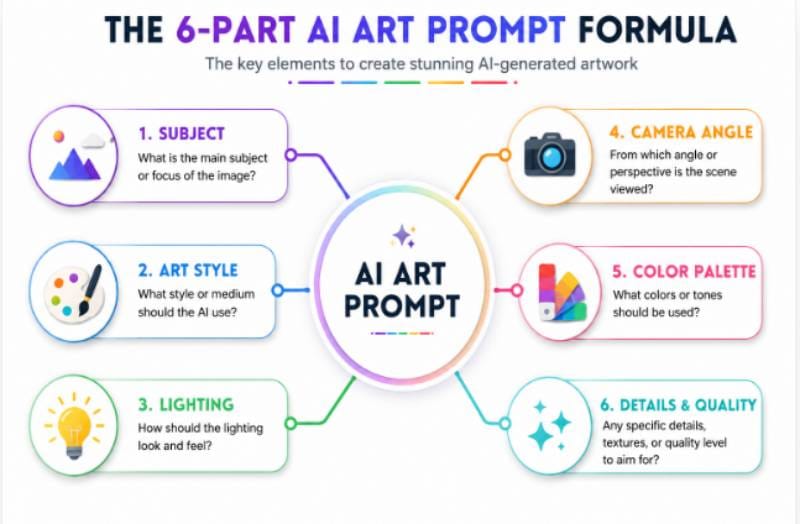
The Proven 6-Part Prompt Formula
To write high-performing prompts consistently, combine these six core building blocks:
[Subject] + [Action/Pose] + [Environment/Background] + [Lighting & Atmosphere] + [Camera/Perspective] + [Artistic Style/Medium]
Key Prompt Components Explained
- Core Subject: Be specific. Replace “a dog” with “an golden retriever puppy sitting on a wooden porch.”
- Environment & Context: Describe surroundings. Add details like “overlooking a misty pine forest during autumn.”
- Lighting & Color: Specify lighting dynamics. Use terms like “golden hour sunlight,” “dramatic chiaroscuro lighting,” “neon glow,” or “soft pastel morning light.”
- Camera Perspective & Lens: Control framing. Use terms like “wide-angle shot,” “macro close-up,” “eye-level perspective,” “85mm portrait lens, f/1.8 aperture, soft bokeh.”
- Artistic Style & Medium: Define the look. Specify styles such as “realistic studio photograph,” “3D isometric render,” “vintage 1970s oil painting,” “minimalist vector art,” or “watercolor on textured paper.”
- Negative Prompts: List what to exclude. Use terms like “blurry, low resolution, extra limbs, distorted hands, oversaturated, watermark, signature, draft.”
Comparison: Weak vs. Optimized Prompts
Weak Prompt: “A coffee cup on a table.”
Optimized Prompt: “A steam-emitting ceramic coffee mug sitting on a rustic dark wood table, cozy coffee shop interior background, soft morning sunlight streaming through window glass, cinematic shallow depth of field, 35mm photography, warm color tones, highly detailed texture.”
Common Mistakes to Avoid When Using AI Art Generators
Avoid these six common mistakes to save time, reduce wasted credits, and produce better visual results:
1. Writing Overly Vague Prompts
Short prompts like “futuristic car” give the AI too much freedom, leading to unpredictable results. Adding specific context regarding environment, lighting, color palettes, and camera framing dramatically improves prompt accuracy.
2. Neglecting Aspect Ratio Settings
Generating a square image (1:1) when you need a widescreen YouTube thumbnail (16:9) or vertical Instagram Story (9:16) forces you to crop and distort your artwork later. Set your target aspect ratio before clicking generate.
3. Skipping Negative Prompts
Ignoring negative prompts allows unwanted elements—like blurry backgrounds, extra fingers, text clutter, or unwanted objects—to show up in your renderings. Use negative prompt fields to filter out unwanted artifacts.
4. Using the Wrong Tool for the Task
Trying to render legible poster text in a photorealism tool like Midjourney, or generating detailed game textures in a vector app, leads to frustrating results. Choose the specialized platform built for your specific asset type.
5. Overlooking Commercial License Terms
Publishing AI-generated graphics on client websites, merchandise, or advertisement campaigns without checking the platform’s commercial licensing terms can create legal risks. Always verify commercial terms before publishing.
6. Expecting Instant Perfection on Attempt #1
AI generation is an iterative creative process. Plan to generate multiple variations, tweak lighting descriptors, adjust prompt weights, and use canvas inpainting tools to polish your final composition.
AI Art Generator Pricing Explained
Understanding how generative AI platforms price their software helps you select a cost-effective plan that aligns with your creative volume:
1. Subscription Plans (Monthly / Annual)
Flat monthly or annual subscriptions (e.g., $10–$30/month) offer a set allowance of fast generation credits or GPU processing hours. These tiers typically include priority speeds, high-resolution upscaling, commercial rights, and private asset generation. Annual billing usually provides a 15–20% discount.
2. Credit-Based Pay-As-You-Go Models
Some software platforms use a credit system where users buy credit packs (e.g., $10 for 1,000 credits). Simple image generations cost 1 credit, while advanced 4K upscaling, custom LoRA training, or complex inpainting operations may consume 5–10 credits per operation.
3. Freemium Models
Freemium options provide a limited number of free credits that reset daily or monthly (e.g., 150 daily credits on Leonardo AI). Free accounts usually experience slower queue speeds, standard export resolutions, and public community feed publication.
4. Self-Hosted / Open-Source (Free Hardware Run)
Open-source models like Stable Diffusion are 100% free to download and run without monthly subscription costs. However, running these models locally requires investing in a modern PC with a powerful graphics card (NVIDIA GPU with 8GB+ VRAM recommended).
Copyright, Ethics & Commercial Use
Understanding legal rules and ethical considerations around AI artwork is essential for professional creators and corporate brand teams in 2026.
Can You Copyright AI-Generated Art?
In many jurisdictions (including the United States), pure AI-generated artwork produced entirely via text prompts without substantial human creative input cannot be registered for traditional copyright protection. However, artwork that combines human digital painting, manual vector editing, complex collage arrangements, and substantial creative direction alongside AI elements may qualify for copyright protection. Legal frameworks continue to evolve globally.
Can You Sell AI Art Commercially?
Yes. Many leading platforms (including Adobe Firefly, Midjourney, Leonardo AI, Canva AI, and Ideogram) explicitly grant commercial usage rights to users on their paid subscription tiers. This allows you to use generated graphics in client projects, marketing campaigns, website banners, physical merchandise, and published books. Always review the specific software provider’s active terms of service before selling AI assets.
Ethical Guidelines for Responsible AI Content
- Respect Artist Attribution: Avoid using living artists’ names directly in prompts to copy their exact signature styles.
- Maintain Disclosure Transparency: Be transparent with clients and audiences when commercial work includes AI-generated assets.
- Avoid Misleading Content: Do not generate deceptive deepfakes, fake news visuals, or fraudulent product photos.
- Respect Copyrighted IP: Refrain from generating protected trademarked logos, copyrighted cartoon characters, or corporate brand assets for commercial resale.
Best Use Cases for AI Art Generators
Generative AI tools accelerate visual production across dozens of practical business and creative applications:
- Blog Headers & Article Visuals: Create eye-catching, custom featured images that improve reader engagement and time-on-page metrics.
- Digital Marketing & Ad Creatives: Generate dozens of ad variations for Facebook, Instagram, Google Display, and LinkedIn ad campaigns in minutes.
- Social Media Visuals: Design custom posts, carousel graphics, story banners, and video cover thumbnails.
- Book Cover & Publishing Concepts: Build fantasy covers, illustration concepts, chapter headers, and promotional book graphics for authors.
- E-Commerce & Product Mock-ups: Visualize lifestyle backgrounds for products before scheduling physical photo shoots.
- Video Game Concept Art: Design character models, environmental concept art, texture maps, and UI iconography during pre-production.
- Website & Landing Page Design: Create custom hero section illustrations, vector icons, background textures, and feature graphics.
- Print-on-Demand Apparel: Produce high-resolution illustrations for t-shirts, posters, mugs, tote bags, and phone cases.
Expert Tips for Better AI Artwork
Follow these four proven workflow tips to consistently get high-quality results from your AI art software:
- Tip 1: Save a Personal “Prompt Swipe File”: Keep a organized document of successful prompts, style keywords, lens parameters, and lighting descriptors that consistently deliver great results across your favorite platforms.
- Tip 2: Master Canvas Inpainting: Rather than regenerating an entire image when a small detail (like an eye or hand) looks off, use region masking (inpainting) to fix only the flawed area while keeping the rest of the canvas intact.
- Tip 3: Combine AI Generation with Manual Editing Tools: Use AI to generate core visual components, then bring those assets into Photoshop, Illustrator, or Canva to adjust color balance, refine typography, fix edges, and apply final brand polish.
- Tip 4: Utilize High-Definition AI Upscalers: Before sending AI artwork to physical print or high-res displays, run your image through a specialized upscaler (like Leonardo Universal Upscaler or Topaz Gigapixel) to crisp up fine details and eliminate noise.
Future of AI Art Generation
The generative AI art landscape will continue to advance rapidly beyond 2026. Key developments transforming visual workflows include:
- Real-Time Instant Generation: Ultra-fast model inference allows artists to see detailed artwork update instantaneously as they move a digital brush or speak prompt updates.
- Flawless Spatial & Character Consistency: Next-generation models can easily maintain exact character faces, clothing, lighting, and spatial layouts across an entire graphic novel or video sequence without drifting.
- Native 3D Asset Synthesis: AI models are moving beyond flat 2D raster pixels into generating fully textured, rigged 3D models ready for immediate import into Unreal Engine, Unity, or Blender.
- Seamless Multimodal Creative Suites: Text, image, audio, video, and 3D generation are converging into unified creative workspaces where creators can turn a single text idea into an entire multimedia campaign.
Frequently Asked Questions
What is the best AI art generator in 2026?
The best choice depends on your specific workflow. ChatGPT Images and Midjourney lead in photorealism and detailed artwork, Adobe Firefly excels for professional design integration, Ideogram dominates typography rendering, and Canva AI provides the best overall design platform for beginners.
Which AI art generator is best for beginners?
Canva AI, Microsoft Designer, and ChatGPT Images are the easiest tools for beginners. They feature natural language editing, drag-and-drop design canvases, and built-in templates that remove the need for technical prompt engineering.
Are there free AI art generators?
Yes, several platforms offer free access. Craiyon is completely free with ad support, while Playground AI, NightCafe, Adobe Firefly, and Leonardo AI offer generous daily free credits or perpetual free tiers with standard generation limits.
Can I use AI-generated images commercially?
Yes, many platforms grant full commercial usage rights, especially on paid tiers. Platforms like Adobe Firefly are specifically designed for safe commercial enterprise use. Always review the terms of service of each specific tool before publishing marketing assets, selling merchandise, or doing client work.
How do AI art generators work?
AI art generators use deep learning neural networks (such as diffusion models or transformer architectures) trained on massive datasets of text-image pairs. When given a text prompt, the AI predicts visual patterns, denoises random visual static, and constructs an original image matching your descriptive keywords.
How can I improve my AI art prompts?
Use a structured prompt format: Subject + Environment + Lighting + Camera Angle + Art Style + Color Palette. Adding negative prompts to exclude unwanted artifacts and specifying precise camera lenses or rendering styles yields far more predictable, high-quality results.
Key Takeaways
- AI art generators help creators and teams produce professional-quality visual assets in seconds.
- The top platforms cater to specific tasks, such as vector icons, photorealism, typography, or social graphics.
- Free tiers are great for learning, while paid tiers deliver higher resolutions, fast queue times, and commercial rights.
- Clear prompt structure—including subject, lighting, camera angle, and style—dramatically improves visual quality.
- Always verify platform commercial licensing agreements prior to using generated artwork for business or client projects.
- Combining AI generation with human design refinement yields the most polished and distinctive visual art.
Conclusion
The 25 Best AI Art Generators featured in this guide demonstrate how far artificial intelligence has evolved. Whether you are a beginner exploring text-to-image creation for the first time or a seasoned digital artist looking to speed up production, there is an AI tool designed for your workflow. Compare features, pricing, canvas editing capabilities, and commercial licensing terms to choose the right fit for your projects.
AI works best as an intelligent creative partner that expands your imagination rather than a total replacement for human vision. By combining clear prompts, smart canvas editing, and your own creative direction, you can produce stunning visuals for blogs, ad campaigns, book covers, software interfaces, and print merchandise. Explore the platforms on this list, experiment with prompt structures, and integrate generative AI into your creative toolkit in 2026.
Final Recommendation
If you are just getting started, launch a beginner-friendly platform with a free plan—such as ChatGPT Images, Canva AI, or Microsoft Designer—to learn core prompting skills. As your creative demands grow, transition to specialized professional platforms like Midjourney, Adobe Firefly, or FLUX to unlock higher output resolutions, canvas editing, and full commercial usage rights.