
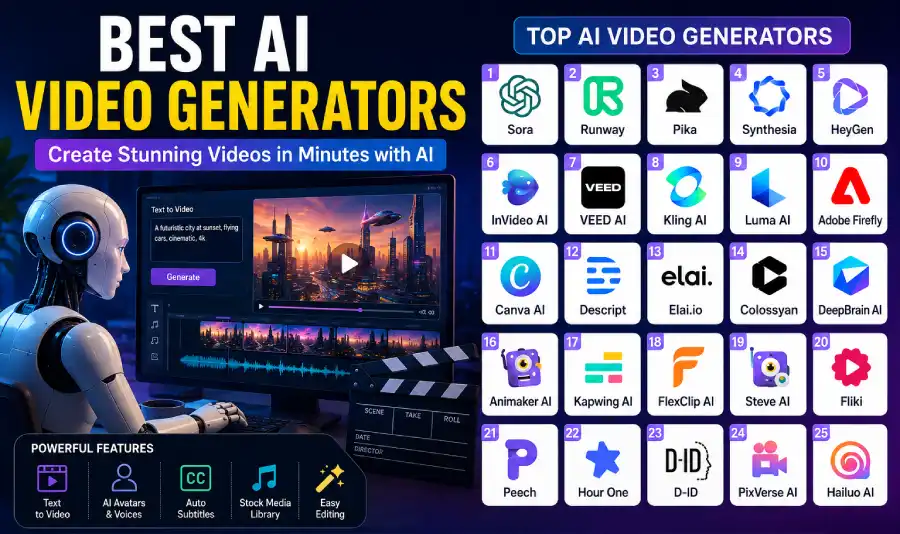
 Whether you manage YouTube channels, run corporate training programs, direct digital advertising campaigns, or design online courses, choosing the right platform is critical for your creative output and production budget. In this complete guide, we review the 25 best AI video generators in 2026, examining their key capabilities, stand-out features, primary use cases, pricing structures, and real-world trade-offs.
Why AI Video Generators Are Dominating in 2026
The rapid growth of AI video creation software stems from massive improvements in spatial consistency, camera movement modeling, and neural voice synthesis. Instead of acting as basic automated slideshow tools, today’s video engines combine text parsing, diffusion visual models, realistic voice cloning, and timeline editing into unified content creation hubs.
By taking over labor-intensive tasks like manual transcription, B-roll selection, background noise suppression, multi-language dubbing, and format resizing, AI tools allow solo creators and lean marketing teams to publish high-volume, professional video assets that rival traditional studio output.
Core Advantages for Modern Workflows
- Turn text prompts, articles, or storyboards into draft videos within minutes.
- Generate realistic AI presenter avatars without hiring on-camera talent.
- Synthesize studio-quality voiceovers across hundreds of natural languages and regional accents.
- Instantly edit video files by editing text transcripts or typing scene adjustments.
- Repurpose static articles, podcasts, and written docs into dynamic YouTube or social clips.
- Eliminate expensive production gear, studio rental costs, and lengthy post-production delays.
- Automate captioning, dynamic subtitle styling, and keyframe animation tracking.
- Maintain brand consistency using centralized asset kits, color palettes, and custom fonts.
How We Evaluated These AI Video Generators
To build this definitive guide, we evaluated each platform against standard benchmarks designed to reflect real production demands for beginners, agencies, and enterprise teams.
- Visual Output Quality: Photorealism, frame consistency, motion fluidness, resolution caps, and physics accuracy.
- Generation Speed: Cloud rendering times, queue processing efficiency, and real-time preview options.
- User Interface & Experience: Ease of adoption for beginners versus depth of timeline controls for experienced editors.
- Avatar & Voice Realism: Lip-sync accuracy, facial expression range, micro-gestures, and vocal naturalness.
- Multilingual Support: Availability of global languages, auto-translation accuracy, and accent selection.
- Editing Capabilities: Canvas flex, B-roll libraries, timeline controls, multi-track audio, and caption editing.
- Commercial Rights & Licensing: Clear commercial terms, stock media safety, and brand export clearances.
- Pricing Value: Credit consumption rates, subscription tiers, free trial access, and team account pricing.
1. OpenAI Sora
OpenAI Sora remains a leading standard for high-fidelity, cinematic text-to-video generation in 2026. Built on a diffusion-transformer architecture, Sora excels at interpreting complex, multi-sentence prompts that detail lighting conditions, camera movements, character emotions, physical environment behaviors, and artistic styles.
Rather than relying on pre-built templates or stock clip assemblies, Sora renders unique, high-resolution visual sequences directly from text input. Its deep understanding of spatial geometry allows it to simulate persistence of vision, keeping characters, objects, and reflections consistent across dynamic camera pans and multi-shot sequences.
Best For
- Filmmakers and visual storytellers
- Creative directors and concept artists
- Commercial advertising agencies
- Pre-visualization and mood board development
Key Features
- Direct text-to-video generation with spatial awareness.
- Photorealistic human rendering and complex environmental physics.
- Precise camera motion control (drone tracking, dolly zooms, tracking shots).
- Character and asset continuity across multiple generated angles.
- High-definition render capabilities suitable for commercial work.
Pros
- Unmatched photorealism and spatial consistency.
- Exceptional handling of atmospheric lighting and fine textures.
- Understands artistic, cinematic, and photographic prompt vocabulary.
Cons
- Higher cost per render generation compared to basic template tools.
- Requires precise prompt drafting to control specific scene details.
2. Runway
Runway (featuring Gen-3 Alpha) continues to serve as a comprehensive workspace for professional filmmakers, video editors, and production houses. It bridges pure generative AI with granular post-production controls, offering text-to-video, image-to-video, and video-to-video models alongside advanced visual effects.
With features like Motion Brush, creators can paint specific sections of a static image to control exact movement direction, speed, and intensity. Runway also provides timeline video editing, automatic background removal, object tracking, and style transfer options, making it a reliable choice for commercial post-production workflows.
Best For
- Professional video editors and post-production studios
- YouTubers and digital content creators
- Visual effects (VFX) artists
- Advertising teams crafting dynamic web ads
Top Features
- Advanced text-to-video and image-to-video generation models.
- Motion Brush for targeted directional control within visual scenes.
- Inpainting tools for easy object insertion, replacement, or removal.
- Green screen background removal and rotoscoping features.
- Camera control settings for speed, zoom, pan, and tilt management.
3. Pika
Pika has established itself as an accessible platform for generating dynamic short clips, social media animations, and creative visual concepts. Designed for quick creation, Pika lets users generate 3D animations, cinematic shots, or anime sequences using natural language, reference images, or existing video files.
Its intuitive interface includes built-in camera movement modifiers, localized visual editing (Modify Region), and canvas lip-sync options. Pika’s speed makes it particularly popular for creators producing fast-paced content for short-form social channels.
Ideal For
- TikTok, Instagram Reels, and YouTube Shorts creators
- Digital marketers testing ad concepts quickly
- Animators developing stylistic visual previews
- Social media managers needing daily video assets
Main Features
- Fast cloud rendering optimized for quick content creation.
- In-video region modification to tweak specific visual elements.
- Pre-set camera controls including tilt, pan, rotate, and zoom speeds.
- Expands aspect ratios seamlessly for vertical or landscape formats.
- Stylized rendering options covering anime, 3D render, and photorealism.
4. Synthesia
Synthesia remains a market leader in corporate AI avatar creation and localized video presentation. Used extensively by enterprise companies, Synthesia eliminates the need for cameras, studios, or professional presenters by generating studio-quality human videos directly from text scripts.
Users select from over 160 stock avatars—or create custom studio avatars—and pair them with natural-sounding voiceovers across 140+ languages. Synthesia includes a complete web editor featuring screen recording, slide deck imports, brand templates, and automatic closed captioning.
Best For
- Corporate L&D, HR, and employee onboarding programs
- Customer education and SaaS product walkthroughs
- Global marketing teams localizing video content
- E-learning course developers
Highlights
- Broad library of hyper-realistic AI avatars with natural micro-expressions.
- Multi-language voice generator supporting regional accents.
- Custom avatar creation tools (including studio and webcam options).
- Direct PowerPoint and PDF presentation-to-video conversion.
- Enterprise-grade security, team workspace controls, and SSO integration.
5. HeyGen
HeyGen specializes in realistic AI avatars, precise lip-syncing, and video translation. The platform stands out for its localized video translation tool, which re-voices videos into dozens of languages while automatically re-aligning the presenter’s lip movements to match the new audio track.
HeyGen allows businesses to build personalized sales outreach videos, product demos, and marketing campaigns using custom digital twins. Its web editor supports custom fonts, brand colors, text overlays, and automated script generation using integrated language models.
Best Features
- Interactive AI avatars capable of real-time streaming presentations.
- Video translation with lip-sync matching across multiple target languages.
- Custom voice cloning to replicate brand spokesperson audio.
- Personalized video generation features for outbound sales workflows.
- Template library designed for product demos and social campaigns.
6. InVideo AI
InVideo AI operates as a complete video production assistant, converting simple topic prompts, scripts, or blog links into edited videos. It handles script generation, footage selection, scene layout, background music, voiceovers, and dynamic subtitle overlays in one automated step.
Users can make adjustments using a simple text box—for instance, typing “make the pacing faster” or “change the background music to an upbeat track.” InVideo AI also offers full timeline editing, stock media access, and voice cloning for creators managing high-volume publishing schedules.
Best For
- YouTube automation channels and faceless video creators
- Content marketers repurposing long-form blog articles
- Small business owners running social ad campaigns
- Educators crafting quick explainer videos
Key Features
- Prompt-driven scriptwriting and video assembly.
- Integrated library featuring millions of royalty-free stock media assets.
- Voice generation with natural pacing and tone adjustments.
- Text-based scene editing and prompt-based adjustments.
- Automated multi-platform aspect ratio conversion.
7. VEED AI
VEED AI blends accessible browser video editing with practical AI tools. Designed for content creators, marketers, and podcasters, VEED offers automatic subtitle generation, background noise removal, video resizing, text-to-speech narration, and AI avatar presentations without requiring complex software setups.
Standout capabilities include Eye Contact Correction—which adjusts a presenter’s gaze to appear to look directly into the camera—and Magic Cut, which automatically trims pauses, filler words, and awkward silences from raw footage.
Best For
- Podcasters creating video clips for social media
- Content creators making YouTube Shorts, Reels, and TikToks
- Social media managers editing quick marketing clips
- Remote teams recording and editing quick video updates
Top Features
- Subtitles with customizable text styles and animations.
- AI Eye Contact Correction for polished talking-head videos.
- Magic Cut editing to remove silences and filler words automatically.
- Screen recording, webcam capture, and multi-track canvas tools.
- Text-to-video draft builder and brand kit management.
8. Kling AI
Kling AI has quickly become a respected choice for text-to-video generation, competing closely on visual fluidity and physical motion accuracy. Developed with advanced spatial diffusion models, Kling produces long video clips featuring natural movement, detailed lighting, and precise character rendering.
The platform excels at complex motion sequences—such as running animals, sports action, or flowing liquids—while maintaining scene geometry. Its prompt engine accurately interprets physical behaviors, making it popular for creative visual projects and ad concepting.
Strengths
- Generates long, continuous video sequences smoothly.
- Accurate physical motion and momentum modeling.
- Detailed rendering of environmental elements like water and fire.
- Flexible camera controls for directional cinematic shots.
- High-resolution exports suitable for professional edits.
9. Luma AI Dream Machine
Luma AI Dream Machine focuses on generating realistic video sequences from text descriptions and static images. Built on a fast transformer architecture, Dream Machine renders high-definition clips featuring fluid camera tracking, natural character physics, and consistent lighting setups.
Its image-to-video mode allows designers to animate static product renders, concept artwork, or photography with smooth motion. Dream Machine is frequently used by creative agencies to quickly turn static wireframes and mood boards into moving mockups.
Ideal Users
- Graphic designers and concept artists
- Advertising agencies crafting visual pitch decks
- Product designers visualizing physical items in motion
- 3D animators building visual reference material
Main Features
- Fast generation speeds powered by efficient cloud rendering.
- Image-to-video animation maintaining source image fidelity.
- Realistic camera tracking, movement, and perspective shifts.
- Clean lighting, depth-of-field, and texture rendering.
- Direct export options for professional post-production software.
10. Adobe Firefly Video
Adobe Firefly Video brings generative AI capabilities directly into Adobe’s professional creative suite, including Premiere Pro and After Effects. Firefly is designed to be commercially safe, trained exclusively on licensed content, Adobe Stock assets, and public domain material.
Instead of acting as a standalone generator, Firefly integrates directly into professional editing timelines. Editors can extend existing clips, generate custom B-roll, smooth out jump cuts, and adjust scene elements using natural language prompts within their existing workflows.
Best For
- Professional video editors using Adobe Premiere Pro
- Film, television, and commercial post-production teams
- Corporate marketing departments prioritizing copyright safety
- Motion graphic designers and visual effects artists
Key Features
- Generative Extension to stretch video clips by extra frames effortlessly.
- Text-to-video B-roll generation directly within editing timelines.
- Commercially safe AI training model backed by Adobe liability protections.
- Deep integration with Premiere Pro, After Effects, and Photoshop assets.
- Automated color matching and audio-aware scene extensions.
Pros
- Fits into professional editing workflows.
- Commercially safe with clear copyright protections.
- High-resolution visual output designed for broadcast standards.
Cons
- Requires an active Adobe Creative Cloud subscription.
- Steeper learning curve for users without traditional video editing experience.
11. Canva AI Video
Canva AI Video brings easy video creation to small business owners, educators, marketers, and social media creators. Integrated into Canva’s drag-and-drop workspace, its Magic Media tool allows users to generate custom video clips from simple text descriptions.
Users can easily combine AI-generated clips with Canva’s extensive library of templates, graphics, audio tracks, and stock footage. The platform also includes automated captioning, background removal, and team collaboration features, making it ideal for quick social media content creation.
Ideal For
- Small business teams managing in-house marketing
- Social media managers creating vertical videos
- Educators and students building presentation decks
- Non-profits producing quick campaign videos
Main Features
- Magic Media text-to-video clip generator integrated into canvases.
- Drag-and-drop editing interface with stock template libraries.
- One-click video resizing for multi-platform distribution.
- Automated subtitle generation and visual text styling.
- Brand Kit integration for consistent fonts, logos, and color palettes.
12. Descript
Descript offers an innovative approach to video and audio editing: it generates a written transcript of your media and lets you edit the video simply by editing the text. Deleting words or sentences from the transcript automatically cuts the corresponding frames from the video timeline.
Descript includes advanced AI features such as Studio Sound—which converts noisy recordings into pristine audio—alongside Eye Contact Correction, automatic filler-word removal (“ums” and “ahs”), and custom voice cloning (Overdub) to fix misspoken words without re-recording.
Best For
- YouTubers editing long-form talking-head videos
- Podcasters creating video podcasts and promotional clips
- Interviewers and journalists reviewing raw footage
- Course creators building structured lesson modules
Top Features
- Text-based video and audio editing timeline interface.
- Studio Sound audio processing for background noise removal.
- Overdub voice cloning to fix audio mistakes via text input.
- Automatic filler-word and pause removal.
- Multi-track video layout controls and social clip export tools.
13. Elai.io
Elai.io helps organizations produce video content at scale without setting up physical recording equipment. It allows users to convert written articles, blog posts, PDFs, or slide presentations into presenter-led video lessons with just a few clicks.
Featuring a wide selection of digital avatars, natural voiceover tracks, and custom avatar builder options, Elai.io is well-suited for corporate training, product onboarding, and multi-language internal communications.
Best Features
- Automated article-to-video and URL-to-video script conversion.
- Generates video lessons directly from uploaded presentation decks.
- Broad library of human avatars alongside digital mascot options.
- Voice synthesis supporting localized multi-language output.
- Interactive video elements including clickable quizzes and links.
14. Colossyan Creator
Colossyan Creator focuses specifically on workplace training, corporate compliance, and educational video production. The platform allows users to create avatar-led videos from written scripts while providing tools tailored for learning design.
A standout capability is multi-avatar scenes, allowing two or more digital presenters to hold realistic conversational scenarios within a single video frame. Colossyan also features built-in quiz modules, auto-translation options, and team workspace management.
Ideal Users
- Corporate Learning & Development (L&D) teams
- HR professionals creating compliance and policy videos
- Instructional designers building interactive online courses
- Sales Enablement teams developing training materials
Features
- Multi-avatar conversations within a single scene frame.
- Interactive in-video quizzes and knowledge checks for learners.
- Instant script translation supporting over 120 global languages.
- PDF and PowerPoint deck conversion into draft video projects.
- SCORM compliant exports for Learning Management Systems (LMS).
15. DeepBrain AI
DeepBrain AI (featuring AI Studios) creates photorealistic digital human avatars capable of delivering scripts with natural gestures, clear articulation, and realistic eye contact. The platform is widely used by news organizations, financial institutions, and retail brands for automated broadcasting and customer communications.
DeepBrain AI offers conversational 3D avatars capable of real-time interaction in kiosk displays, customer support channels, and virtual assistant environments, in addition to standard video file generation.
Key Features
- Hyper-realistic AI presenters trained for formal broadcasts.
- Text-to-video workflow with automated script formatting.
- Conversational real-time avatar capabilities for interactive deployment.
- Multi-language text-to-speech engine with regional accents.
- Pre-built templates for news production, sales, and educational decks.
16. Animaker AI
Animaker AI brings animation tools to businesses, marketers, and educators who want to create engaging animated explainer videos, whiteboard presentations, and social clips without hiring professional animators.
Users simply type a project description, and the AI drafts a complete animated video containing scenes, characters, background music, auto-generated voiceovers, and dynamic text overlays. The built-in editor allows full customization of character outfits, actions, facial expressions, and camera moves.
Best For
- Startups crafting product explainer videos
- Teachers and educators building animated lessons
- Marketing teams running social video campaigns
- Internal communications teams making fun company updates
Main Features
- Generates animated video scenes from text descriptions automatically.
- Massive library of customizable characters, assets, and props.
- Auto-lip-syncing for added voiceover tracks.
- Whiteboard animation styles alongside 2D vector layouts.
- Multi-track audio editor with royalty-free music selections.
17. Kapwing AI
Kapwing AI offers an intuitive, browser-based video editing platform built for content teams and social media creators. It simplifies editing by offering AI tools like automated subtitle generation, smart scene trimming, text-to-video creation, background removal, and multi-language translation.
Kapwing’s real-time collaborative workspace lets multiple team members edit videos together simultaneously—similar to editing in Google Docs. This makes it a great choice for fast-moving social media and marketing teams.
Top Features
- Real-time multi-user editing workspace for collaborative teams.
- Automated subtitle generator with custom brand styling.
- Smart B-roll generator that places relevant stock media automatically.
- Text-based video editing and automatic filler-word removal.
- One-click aspect ratio resizing for vertical and widescreen channels.
18. FlexClip AI
FlexClip AI provides a straightforward online video editing interface that combines AI generation with pre-built templates. It helps users quickly generate promotional videos, real estate tours, slideshows, and social ad clips without advanced editing experience.
FlexClip includes tools like text-to-video conversion, AI script generation, automatic subtitle creation, text-to-speech voiceovers, and background removal, supported by a deep library of royalty-free stock assets.
Highlights
- Simple storyboard and timeline editing interfaces suitable for beginners.
- AI scriptwriter powered by advanced natural language models.
- Automated text-to-video builder with integrated media selection.
- Clear text-to-speech voice generator across multiple accents.
- Large library of pre-designed video templates and stock visuals.
Feature Comparison of the Top AI Video Generators
The table below compares the core capabilities, editing depth, and ideal use cases for the top AI video generation platforms.
- Basic Prompts
| Platform | Text-to-Video | AI Avatar | Voice Clone | Editing Control | Primary Use Case |
|---|---|---|---|---|---|
| OpenAI Sora | Yes | No | No | Cinematic & VFX Concepting | |
| Runway | Yes | No | No | Advanced Timeline | Film & Commercial Post-Production |
| Pika | Yes | No | No | Moderate Canvas | Short-Form Social Clips |
| Synthesia | Yes | Yes | Basic | Template Layouts | Corporate Training & L&D |
| HeyGen | Yes | Yes | Yes | Moderate Canvas | Localized Marketing & Sales |
| InVideo AI | Yes | Limited | Yes | Prompt + Timeline | YouTube Automation & Blogs |
| VEED AI | Limited | Yes | Yes | Advanced Timeline | Podcasts & Content Creation |
| Kling AI | Yes | No | No | Basic Prompts | High-Motion Visual Scenes |
| Luma AI | Yes | No | No | Basic Prompts | Product Animations & Ads |
| Adobe Firefly | Yes | No | No | Professional Timeline | Broadcasting & Premiere Pro |
Pricing Comparison
Below is an overview of starting prices, free tier availability, and commercial licensing options across major AI video tools.
| Platform | Free Plan / Trial | Starting Paid Tier | Commercial License |
|---|---|---|---|
| OpenAI Sora | Limited Access | Tiered Subscriptions | Yes (Paid Tiers) |
| Runway | Yes (125 One-time Credits) | From $12/month | Yes |
| Pika | Yes (Daily Credit Refills) | From $8/month | Yes |
| Synthesia | No (Free Demo Video) | From $18/month | Yes |
| HeyGen | Yes (1 Free Credit) | From $24/month | Yes |
| InVideo AI | Yes (With Watermark) | From $20/month | Yes |
| VEED AI | Yes (With Watermark) | From $12/month | Yes |
| Canva AI | Yes (Basic Magic Credits) | From $15/month | Yes |
| Descript | Yes (1 Hour Transcription) | From $12/month | Yes |
Which AI Video Generator Fits Your Workflow?
Matching a platform to your specific content requirements helps avoid overpaying for unnecessary features:
- YouTubers & Content Creators: Runway, InVideo AI, Descript, VEED AI, and Kapwing AI offer strong tools for script creation, automated B-roll selection, fast timeline editing, and captioning.
- Enterprise Training & L&D: Synthesia, HeyGen, Colossyan Creator, and DeepBrain AI provide professional avatars, multi-language translation, slide deck conversions, and LMS integration.
- Social Media Managers: Pika, Canva AI, Kapwing AI, and FlexClip AI excel at quick vertical clips, template design, simple editing, and dynamic text overlays.
- Filmmakers & Visual Studios: OpenAI Sora, Runway Gen-3, Kling AI, Luma Dream Machine, and Adobe Firefly Video offer high-fidelity photorealism, detailed camera controls, and smooth motion modeling.
- Educators & Course Instructors: Elai.io, Synthesia, Animaker AI, and Descript simplify converting written lessons, slides, and transcripts into clear educational videos.
- Marketing Agencies: HeyGen, InVideo AI, Canva AI, and VEED AI make it easy to craft localized ad variations, produce quick client mockups, and scale social video campaigns.
19. Steve AI
Steve AI helps users convert blog posts, written scripts, and HTML text links into engaging live-action or animated videos. It is designed for content marketers, bloggers, and educators looking to repurpose written content into video formats quickly.
Its script-parsing engine evaluates uploaded text, splits sentences into logical visual scenes, assigns relevant stock media or animated characters, and adds auto-generated voiceovers. Users can fine-tune visual assets, background audio, and text formatting using a simple editor.
Best For
- Marketers converting long-form articles into social clips
- Bloggers adding summary videos to written posts
- Educational teams creating quick animated guides
- Internal comms teams building quick text updates
Key Features
- Automatic text-to-video conversion for articles and blog links.
- Dual video rendering engines supporting live-action and 2D animation.
- Broad library of animated characters, actions, and graphic assets.
- Built-in voice synthesis engine with multiple accent options.
- Fast scene layout adjustments using a simple drag-and-drop editor.
Pros
- Saves significant time when repurposing existing articles.
- Simple interface suitable for non-technical users.
- Flexible options for both live-action and animated layouts.
Cons
- Less control over advanced keyframe animations.
- Live-action stock selections can sometimes feel generic.
20. Fliki
Fliki focuses on turning written ideas, blog posts, scripts, and tweets into polished videos using natural AI voices. It is especially popular among faceless YouTube creators, affiliate marketers, and podcasters who need clean voiceovers combined with relevant stock visuals.
Fliki offers an extensive library of over 2,000 realistic text-to-speech voices across 75+ languages. Its block-based editor lets creators build videos line by line—adjusting background visuals, captions, and vocal timing directly alongside the written script.
Best For
- Faceless YouTube channel automation and narration
- Podcasters converting audio episodes into video clips
- Affiliate marketers building quick product review videos
- Educators creating voiceover-driven instructional content
Main Features
- Text-to-video builder for blog posts, tweets, and scripts.
- Vast voice synthesis library featuring natural regional accents.
- Built-in stock image and royalty-free video asset integration.
- Dynamic caption styling with animated word highlighting.
- Voice cloning options to maintain brand voice consistency.
21. Peech
Peech is designed for content marketing teams and agencies that regularly produce branded talking-head videos. It automates editing, branding, subtitle formatting, and social media clip generation, allowing marketing teams to publish videos without relying on external post-production resources.
By calibrating your company’s Brand Kit—including logos, color palettes, fonts, and intro stings—Peech applies custom visual branding across all uploaded video footage automatically. Its editing engine detects speech pauses, creates smart captions, and highlights key soundbites for social media sharing.
Top Features
- Automated brand asset application for logos, colors, and lower thirds.
- Smart speech editing that flags highlights and clips automatically.
- Subtitles customized to match company style guides.
- Repurposing engine to convert long interviews into short social clips.
- Collaborative multi-user workspaces for team reviews.
22. Hour One
Hour One allows businesses to transform written communications into professional presenter-led videos. It is widely used for employee onboarding, customer support guides, product walkthroughs, and corporate training.
Users select an avatar presenter, choose a background environment, input their written script, and receive a completed video file within minutes. Hour One includes integrations with platforms like PowerPoint, letting enterprise teams convert slide decks into narrated videos effortlessly.
Ideal For
- HR teams updating internal training and policy materials
- Customer Success managers building self-serve help videos
- Sales Enablement leaders crafting personalized outreach decks
- Enterprise communications teams sending global video updates
Key Features
- Professional AI human presenters suited for business communications.
- Direct PowerPoint slide conversion into narrated video decks.
- Multilingual voice generation supporting international teams.
- Custom background choices featuring office setups or digital layouts.
- API capabilities for automated enterprise video creation.
23. D-ID Creative Reality Studio
D-ID specializes in animating still portraits, illustrations, or historical photos into talking avatars using deep learning models. By combining a single static image with an audio file or text script, D-ID renders realistic head movements, natural lip-syncing, and expressive facial motion.
The platform is popular for building interactive museum exhibits, personalized marketing campaigns, educational guides, and virtual assistants. D-ID also provides robust API access, allowing developers to integrate real-time talking avatars directly into web apps and messaging channels.
Main Features
- Generates talking avatar videos from any single high-resolution photograph.
- Combines seamlessly with generative AI image tools like Midjourney.
- Text-to-speech engine supporting natural multi-language voices.
- Developer API for streaming real-time interactive avatars.
- Web studio interface for quick video generation and export.
24. PixVerse AI
PixVerse AI is a popular tool for creators generating stylized text-to-video and image-to-video clips. It offers fine control over artistic rendering styles, including cinematic realism, 3D anime, cyberpunk visuals, and fantasy illustrations.
PixVerse features fast render queues, customizable camera motion controls, and high-definition upscaling, making it a favorite for short-form video creators building eye-catching visuals for Reels, TikTok, or music production concepts.
Best For
- Social media creators making visually striking short clips
- Digital artists animating static illustrations
- Musicians generating creative visualizers and concept art
- Indie game developers creating quick cinematic previews
Highlights
- Flexible style presets covering anime, 3D render, and photorealism.
- Image-to-video motion control for static digital artwork.
- Built-in visual upscaling tools for clear 4K exports.
- Simple camera directional prompts (panning, tracking, zooming).
- Active creative community with shared prompt libraries.
25. Hailuo AI Video
Hailuo AI Video (featuring Minimax) is a strong text-to-video platform recognized for its generation quality, precise prompt accuracy, and natural physical motion rendering.
It excels at handling complex human gestures, expressive facial movements, atmospheric lighting effects, and environmental camera motion. Hailuo AI is widely used by digital creators and indie filmmakers seeking cinematic clips without heavy post-production work.
Key Features
- High prompt accuracy with strong spatial understanding.
- Natural motion rendering for human subjects and physical surroundings.
- Clean handling of intricate textures, lighting, and reflections.
- High-definition cloud rendering optimized for cinematic clips.
- Simple web-based platform with fast generation processing.
How to Choose the Right AI Video Generator
Selecting the ideal AI video tool depends on your primary content goals, technical experience, editing preferences, and monthly software budget.
Key Decision Factors
- Define Your Core Content Style: If you need real human presenters for training, prioritize avatar platforms like Synthesia or HeyGen. If you need cinematic visual storytelling, choose tools like OpenAI Sora, Runway, or Kling AI.
- Evaluate Your Editing Needs: Solo creators who want all-in-one automation will prefer tools like InVideo AI or Fliki, while experienced video editors will benefit more from timeline-based control in Adobe Firefly or Runway.
- Check Multilingual and Translation Support: For global marketing or multi-region training, ensure the platform offers localized voice synthesis, accurate lip-sync re-alignment, and automated subtitle translation.
- Review Commercial Rights and Stock Clearances: Always confirm whether a platform’s base tier includes full commercial usage rights—especially if you plan to run paid advertising campaigns or monetize content on YouTube.
- Test Free Tiers and Credit Consumption: Take advantage of free trials to evaluate generation speed, interface usability, and final render quality before committing to an annual subscription.
Key Features to Prioritize
- Text-to-video generation accuracy and spatial coherence
- Image-to-video animation controls
- Realistic avatar options and custom digital twin creation
- High-quality text-to-speech voice synthesis and cloning
- Automated captions with customizable styling
- In-video object removal and regional editing (inpainting)
- Deep libraries of commercial royalty-free stock assets
- Multi-format aspect ratio exports (16:9 widescreen, 9:16 vertical)
- Team collaboration features, asset sharing, and brand kits
- Direct platform API access for automated enterprise workflows
Advantages of Integrating AI into Video Workflows
- Dramatically cuts video production time from days to minutes.
- Reduces reliance on expensive studio equipment, cameras, and talent fees.
- Lowers the technical barrier to entry for non-editors and marketers.
- Accelerates multi-language content localization for global audiences.
- Keeps social media channels active with a steady stream of video content.
- Simplifies repurposing written blogs, transcripts, and decks into video formats.
- Allows fast A/B testing for digital advertising variations.
Important Considerations and Limitations
- Generating complex prompts may require trial and error to achieve exact scene details.
- Free tiers often include watermarks, capped render resolutions, or restricted usage rights.
- Human oversight remains essential to verify script accuracy, pacing, and brand alignment.
- Licensing agreements for stock audio and visual assets vary across subscription levels.
- Rendering times can slow down during peak server usage on public cloud platforms.
Final Verdict
AI video generation platforms have become essential production tools for creators, businesses, educators, and marketing teams in 2026. By removing technical editing barriers and high production overheads, these software tools allow creators to focus on storytelling, strategy, and messaging.
For cinematic visual generation and post-production control, OpenAI Sora, Runway, Kling AI, and Adobe Firefly Video represent industry standards. If your workflow centers on corporate communication, localized sales, or online training, avatar platforms like Synthesia, HeyGen, and DeepBrain AI offer unmatched efficiency. For YouTubers, bloggers, and social media managers who need quick turnaround times, InVideo AI, Descript, VEED AI, and Fliki provide excellent automated editing options.
We recommend starting with free trials across two or three platforms that align with your immediate goals. Test their prompt handling, review their export quality, and verify how easily they fit into your existing content workflow before selecting a long-term subscription.
Frequently Asked Questions (FAQs)
1. What is the best AI video generator in 2026?
The best AI video generator depends on your specific production goals. OpenAI Sora, Runway, and Kling AI lead in cinematic text-to-video visual generation. Synthesia and HeyGen are top choices for corporate presenter avatars, while InVideo AI, Descript, and VEED AI work best for social media and YouTube workflows.
2. Can AI create full videos directly from text?
Yes. Modern AI video platforms accept detailed text prompts or full scripts to generate high-definition video clips complete with transitions, stock media, voiceovers, background audio, and dynamic subtitles.
3. Which AI video generator works best for YouTube?
Runway, InVideo AI, VEED AI, Fliki, and Descript are top choices for YouTubers because they combine fast script conversion, text-based audio editing, automated captioning, and stock footage integration.
4. Are free plans available for AI video generators?
Most AI video tools offer free trial tiers or basic plans with monthly generation credits, though free versions usually apply watermarks, cap export resolutions, or restrict commercial licensing rights.
5. How realistic are AI presenter avatars in 2026?
Platforms like Synthesia, HeyGen, DeepBrain AI, and Hour One produce highly realistic digital presenters featuring natural lip-syncing, subtle facial expressions, micro-gestures, and multi-language voice matching.
6. Which AI video generator is best for corporate business training?
Synthesia, Colossyan Creator, HeyGen, and Hour One are built specifically for corporate environments, offering brand kits, localized multi-language voice tracks, screen recording integration, and interactive learning features.
7. Can AI video platforms generate custom voiceovers?
Yes. Leading platforms include text-to-speech voice generators across dozens of accents and languages, alongside secure voice-cloning capabilities to replicate a specific presenter’s tone.
8. Are AI-generated videos cleared for commercial marketing use?
Most paid subscriptions include full commercial usage rights, though creators should verify platform terms, royalty-free music licenses, and stock visual rights before running paid media campaigns.
9. What should beginners look for in an AI video tool?
Beginners should prioritize clean browser-based interfaces, pre-made video templates, automated script writing, one-click subtitle generation, and affordable entry-level pricing tiers.
10. Will AI replace traditional video editors?
AI drastically accelerates repetitive production tasks like cutting, transcription, and scene drafting, but skilled human video editors remain essential for creative direction, pacing, emotion, and brand storytelling.
Conclusion
AI video generators have fundamentally changed modern content production, making it faster and more cost-effective for creators and organizations of all sizes to produce high-quality videos. Whether you are generating cinematic visual sequences, building corporate e-learning modules, or automating daily social media uploads, there is a specialized tool available for your workflow.
As generative AI models continue to evolve, video production will become increasingly intuitive, allowing creators to spend less time managing complex technical setups and more time building compelling narratives.